PRO SERIES WORKLIGHT

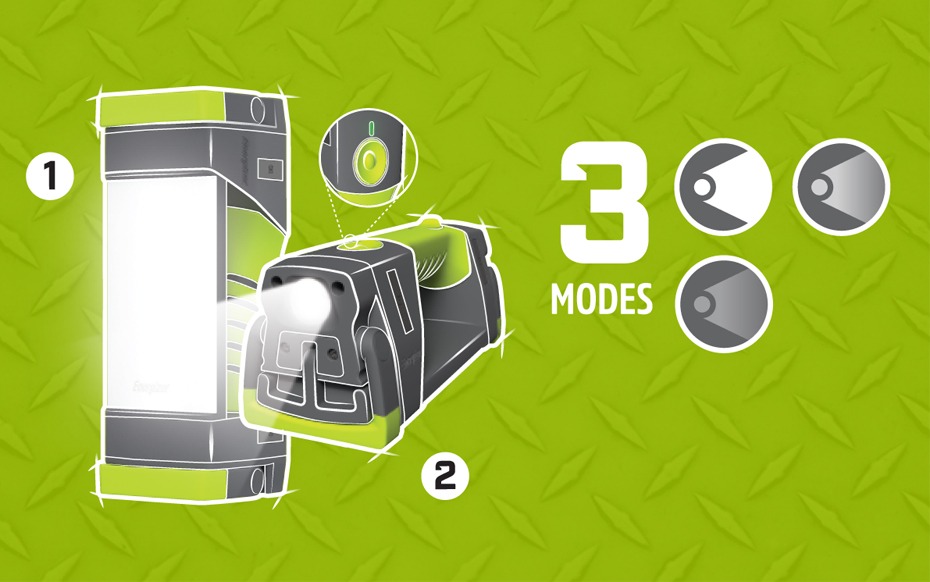
The Energizer Pro Series Hybrid Work Light offers versatile lighting options, functioning as both an area and directional light. Its hybrid power system ensures you always have light when you need it by operating on 3 AA or rechargeable batteries. It also includes a power bank with a USB outlet to charge devices.
Built to withstand tough conditions, this work light is durable, waterproof and dustproof. Additional features include a hanger hook, adjustable legs for directing light, a non-slip grip, tripod adaptability, magnets for attachment and storage and a rechargeable battery life indicator—all in one light.

OPERATING INSTRUCTIONS

HOW TO USE :

Press on/off button to turn on.

1. FOR AREA LIGHT

  • Press 1 time for high
  • Press 2 times for medium
  • Press 3 times for low

2. FOR DIRECTIONAL LIGHT

  • Press and hold button in any mode for directional light.
  • Press button in any mode after 2 seconds to turn off.
  • HOW TO POWER :

    HYBRID POWER: RUNS ON RECHARGEABLE OR PRIMARY (AA) BATTERIES
    • Rechargeable batteries and primary batteries (AA) cannot be used at the same time.
    • Light may be used in low mode while charging (in or out) but charging time will be increased.
    • For best charging performance, charge (in or out) with the light turned off. ​

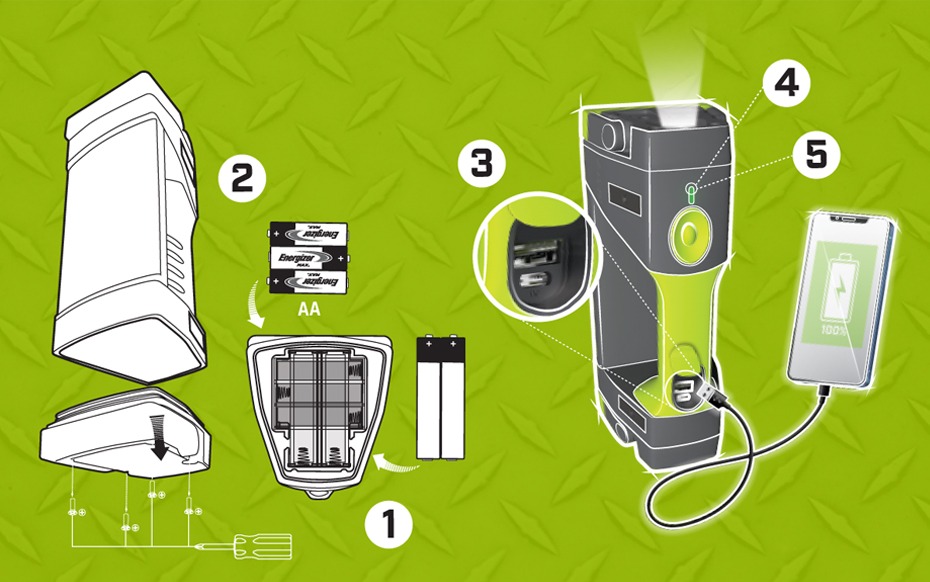
    1. TO USE RECHARGEABLE BATTERIES .

    • Use screwdriver to open bottom door to access batteries.
    • Insert the rechargeable batteries following the orientation marks on the batteries and battery compartment.
    • Keep rechargeable batteries inside the light to charge.
    • Connect the provided USB cable to the light, then plug it into any USB charging port.

    2. TO USE PRIMARY BATTERIES (AA).

    • Use screwdriver to open bottom door to access batteries.
    • Insert the AA batteries following the orientation marks on the batteries and battery compartment

    3. TO CHARGE DEVICE

    • Connect the device’s cable to the charging port, then plug in the device to start charging.
    • The light cannot be charged while it’s being used to charge a device

    4. CHARGING INDICATOR.

    • Charging indicator is located above the power button.
      Red = charging light
      Green = charging light complete

    5. BATTERY INDICATOR :

    • The battery indicator light is located above the on/off button.
    • After the light is turned on, the battery indicator will illuminate for ~5 seconds.
    • The battery indicator is for rechargeable battery use only.
      Green = more than 50%
      Yellow = 25% – 50%
      Red = less than 25%
      Flash red = less than 10%”

    DESIGN FEATURES :

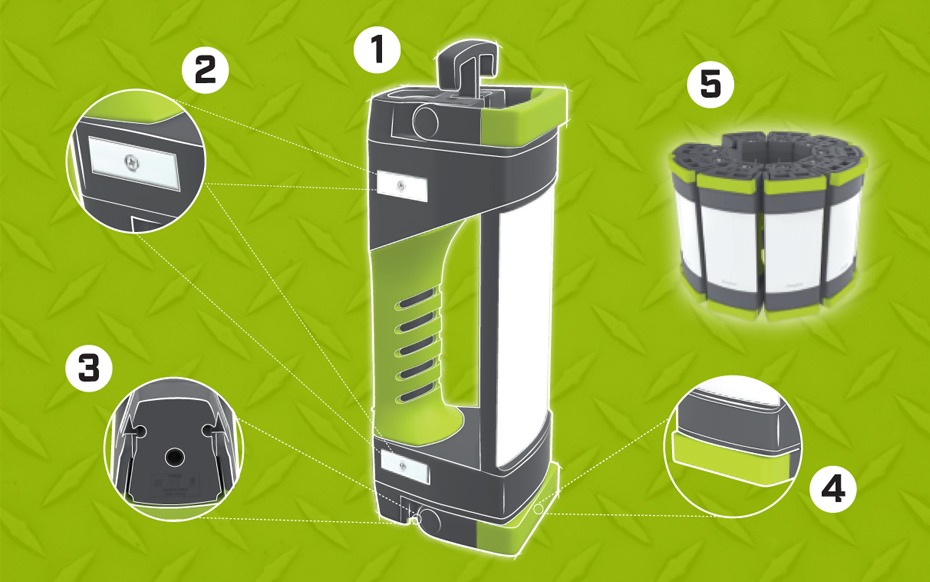
    1. MULTIPLE OPTIONS FOR HANDS-FREE USE


    1. Hanger hook
    2. Magnet
    3. Tripod-adaptable
    4. Adjustable legs
    5. Linkable using magnet attachments