PRO SERIES FOCUSING HYBRID HEADLAMP

The Energizer Pro Series Focusing Hybrid Headlamp is an innovative headlamp solution within Pro Series Portfolio.  Featuring bright, durable and energy efficient LED technology, users get a bright, lightweight, hands-free solution with ample run time capability. High CRI LED provides the consumer with clear, high-definition color clarity. Featuring patented Digital Focus, users can easily broaden or narrow their field of vision with a simple button press. With a comfortable, adjustable head strap, anti-glare design, and pivoting head to direct light exactly as needed, this headlamp is a perfect on the job solution.

OPERATING INSTRUCTIONS

HOW TO USE :

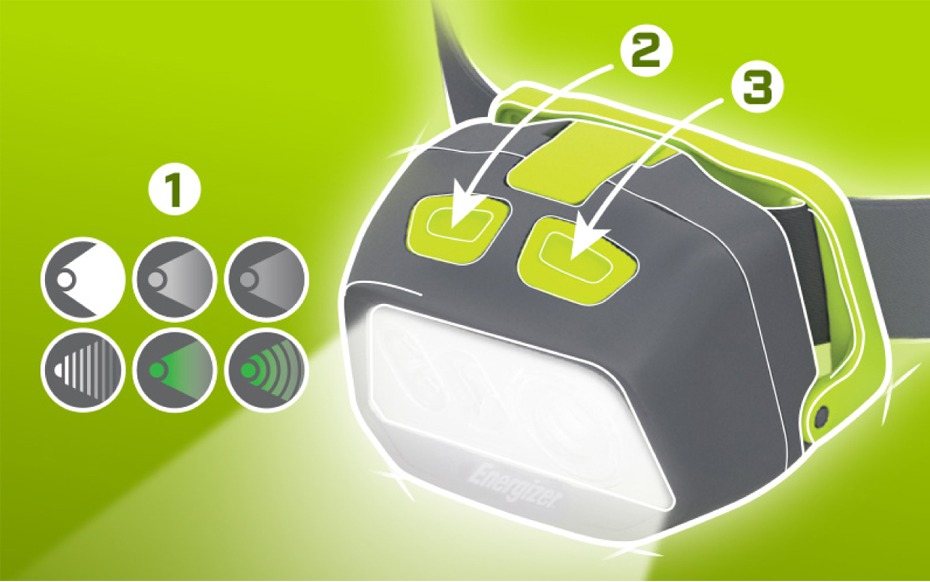
1. 6 MODES

2. For White Modes

  • Press 1 time for high
  • Press 2 times for medium
  • Press 3 times for low

FOR DIGITAL FOCUS

Press and hold right button on high or low to adjust the width of the beam. Release to set focus setting.

3. FOR GREEN MODES

Press left button for green modes
  • Press 1 time for green
  • Press 2 times for flashing green
After 2 seconds in any mode, next press will be off

HOW TO POWER :

HYBRID POWER: RUNS ON PRIMARY BATTERIES (AAA) OR A RECHARGEABLE BATTERY

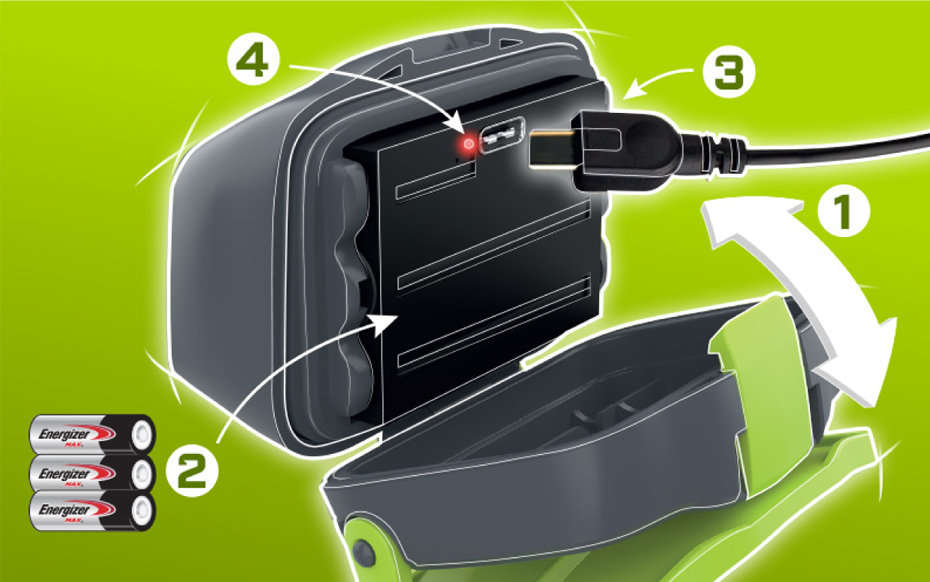
1. TO OPEN BATTERY DOOR

  • Pivot headlamp forward
  • Lift latch to unlock battery door ​
  • Close and press latch to lock
Note: Primary batteries and rechargeable battery cannot be used at the same time.

2. TO USE PRIMARY BATTERIES

Open battery door and follow orientation instructions inside battery compartment to replace 3AAA batteries

3. TO USE THE RECHARGEABLE BATTERY

  • Insert the rechargeable battery following the orientation marks on the battery and battery compartment.
  • For charging, the rechargeable battery can be left in the light or removed.​
  • Light must be turned off during charging if rechargeable battery is left inside the light.
  • Light may operate on primary batteries while rechargeable battery charges outside of the light
  • To charge use included USB cord and plug battery into any USB charging port.

4. Rechargeable battery change indicator

  • A charge indicating light is located by the USB port and will illuminate when USB charging has started.
  • Red = charging
  • Green = charging complete

DESIGN FEATURES :

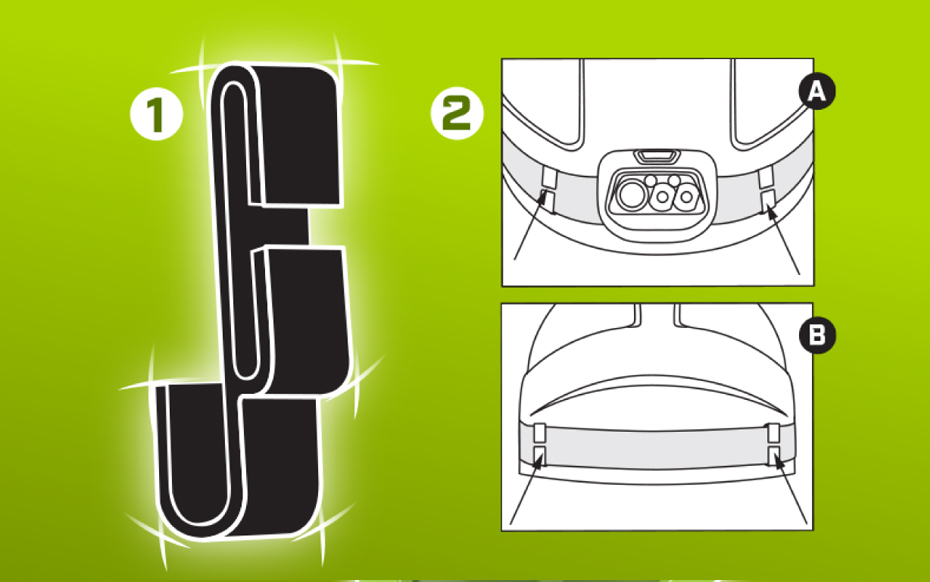
1. UNIVERSAL HELMET ATTACHMENTS

Attaches to hard hats or helmets

2. TO ATTACH:

  • 1. Ensure surface of the helmet is clean and oil free.
  • 2. Adjust head strap to fit size of hard hat/helmet.
  • 3. Place head strap around hard hat/helmet and position accordingly.
  • 4. Remove film from one side of the double-sided tape and attach to each clip, keeping film over other side.
  • 5. Fit two of supplied attachment clips on the front of hard hat/helmet. (Figure A)
  • 6. For front two clips, remove film off other side of double-sided tape and attach to hard hat/helmet to hold in place.
  • 7. Fit two of supplied attachment clips on back of hard hat/helmet. (Figure B)
  • 8. For rear two clips, remove film off other side of double-sided tape and attach to hard hat/helmet to hold in place.
  • 9. Head strap can be removed and reattached to helmet without removing the attachment clips.