
Instructions


KCFM2C Find Me Keychain Light
Apple, Apple Find My, Apple Watch, Find My, iPhone, iPad, iPadOS, Mac, macOS and watchOS are trademarks of Apple Inc., registered in the U.S. and other countries. IOS is a trademark or registered trademark of Cisco in the U.S. and other countries and is used under licence.
Description of Parts
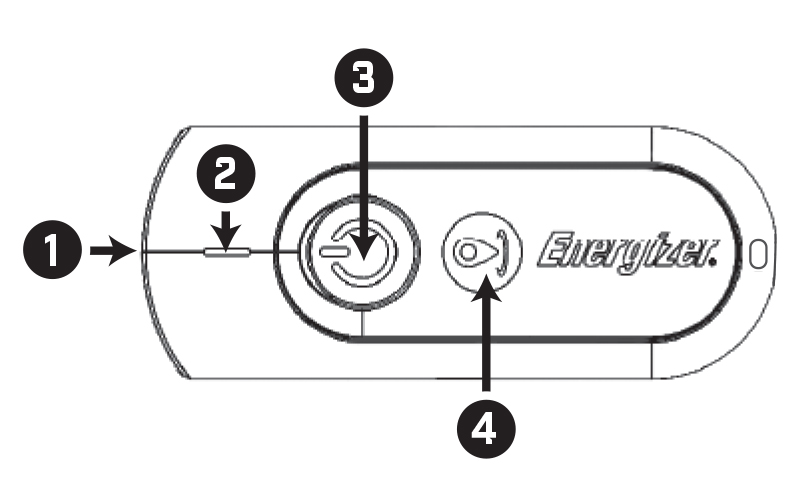
- 1. Flashlight Lens
- 2. Find My Indicator Light
- 3. Flashlight On/Off Button
- 4. Find My Pairing Button
- The keychain light is off when removed from the packaging.
- Turning on the keychain light will enable both the flashlight and Find My pairing.
- Press the Find My pairing button once to turn it on.
- You may turn off the keychain light when not in use to extend battery life and prevent accidental activation.
- Turning off the keychain light will disable both the Flashlight and Find My function.
- To Turn Off: Press and hold the Find My Button for three seconds. Three confirmation beeps will sound and the light will flash three times.
- Push the Find My pairing button again to turn keychain light back on.
- Push the Flashlight On/Off Button to turn on the torch.
- Push the Flashlight On/Off Button again to turn off the torch.
- To extend battery life, turn the Flashlight off when not in use.
- To Connect Keychain Light to Apple Find My App:
- Ensure a stable internet connection, enable Bluetooth® and update your device to the latest version of iOS or macOS.
- Open the Apple Find My app.
- Push the Find My pairing button. The keychain light will emit a tone. Find My Indicator Light will blink and turn on.
- Hold the keychain light close to your Apple device.
- Tap the “Items” tab, tap the “+” icon and tap “Add Other Item”
- Device will search the item and display “Energizer Finder”
- Tap “Connect”
- Enter a name for your keychain light and tap continue.
- Select an emoji and tap continue.
- Tap “Agree” to acknowledge that the keychain light will be linked to your Apple ID.
- Tap “Finish” and keychain will be paired.
- To Remove Keychain Light from Apple Find My App:
- The keychain can be paired to only one Apple ID at a time. You must remove the keychain from the Apple Find My app to pair to a new Apple ID.
- Place keychain next to your iPhone to ensure a stable connection.
- Open the Apple Find My app, tap the “items” tab, then tap your keychain light.
- Scroll to bottom of page and tap “Remove item”
- Pop up to remove will appear. Tap “Remove”
- After successful removal, the keychain light will emit a tone.
- Factory Reset
- If you’re having trouble connecting, try resetting the keychain light.
- To reset: Push the Find My Pairing Button five times—tap four times quickly, then push and hold on the fifth.
- The Find My Indicator Light will flash three times and emit three beeps, confirming a factory reset.
- Push the Find My button to turn the keychain light back on.
- Directions in Maps:
- Open the Apple Find My app, tap the “Items” tab, then tap your keychain light.
- Tap “Directions”
- Tap “Go” to follow Apple Map Directions.
- Play Sound
- Open the Apple Find My app, tap the “Items” tab, then tap your keychain light.
- Click “Play Sound” and the keychain light will emit a tone and the Find My Indicator Light will flash.
- Tone will beep and the Find My Indicator Light will flash for ~10 seconds.
- Repeat steps above until your keychain light is found.
- Note Play Sound function works within a 10-metre range.
- If you’re out of range, use the Directions feature to move closer until Play Sound is available.
- Share Item
- Open the Apple Find My app, tap the “Items” tab, then tap your keychain light.
- Under “Share Item” tap “Add Person”
- Screen will change, tap “Continue”
- Select the contacts you want to share from your address book.
- After contacts are selected, tap “Share” in top right corner.
- The contact will have to accept the share invitation.
- After accepting the invitation, the selected contacts will be able to use Play Sound or Direction in Maps feature.
- Lost Item – Share Contact Info
- Open the Apple Find My app, tap the “Items” tab, then tap your keychain light.
- Scroll down to “Lost Item”
- Tap “Show Contact Info” and then tap “Continue”
- Then you will be prompted to enter a phone number or email address for others to contact you.
- Tap “Next”
- Tap “Show Information”
- To remove, tap back into “Show Contact Info” and select “Remove Contact Info” then tap “OK”
- Lost Item – Share Item Location
- Open the Apple Find My app, tap the “Items” tab, then tap your keychain light.
- Scroll down to “Lost Item”
- Tap “Share Item Location” and then tap “Continue”
- Tap “Done” in top right corner.
- To stop sharing item location, tap back into “Share Item Location”
- Tap “Stop Sharing Item Location” tap “Continue”
5. Replacing Battery
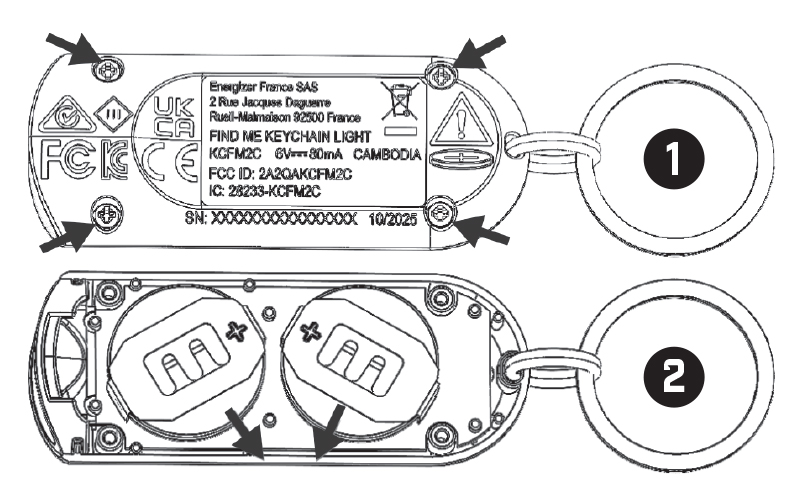
- Use screwdriver to loosen 4 screws as shown on figure 1 and remove the back cove
- Slide out the two batteries as shown on figure 2
- Replace with two new CR2032 batteries (positive side up)
- Replace back cover and tighten screws using screwdriver
FAQ
The Apple Find My network provides a secure and easy way to locate your personal items using the Find My app on your Apple devices. By pairing your item with the app, you can view its location alongside your other devices signed in with the same Apple ID. If your item becomes separated from your iPhone, millions of Apple devices worldwide will detect its Bluetooth signal and securely upload its location to iCloud, allowing you to see its latest position in the Find My app. If lost, you can activate Lost Mode to display a message and your contact information to anyone who might find it. Only you can view your item’s location, as your location data and history are never stored on the item itself. Devices that relay its location remain anonymous, and all data is encrypted, ensuring that no one else, including Apple, can access your device’s location or the identities of the assisting devices. These privacy protections prevent unauthorised tracking, keeping your information secure and private. Leveraging billions of Apple devices globally, the Find My network securely and anonymously detects and relays your item’s location. With advanced encryption and strict privacy measures, you can confidently use the Find My app to easily locate your personal items while safeguarding your privacy.
If your item is separated from your iPhone, other Apple devices in the Find My network will detect the item’s Bluetooth signal and securely upload its location to iCloud. You can then view the item’s latest location in the Find My app. To protect your privacy and prevent unauthorised tracking, if a Find My network accessory separated from its owner is seen moving with you over time, you’ll be notified in one of two ways: if you have an iPhone, iPad, or iPod touch running iOS or iPadOS 14.5 or later, Find My will send a notification to your device, and you can see the trail of your movements on the map and put the item into shutdown mode; otherwise, the accessory will emit a sound when moved. These anti-tracking features are specifically designed to discourage people from trying to track you without your knowledge. All location data is anonymous and encrypted to ensure everyone’s privacy is maintained.
Regulatory Safety Information
WARNING: KEEP BATTERIES OUT OF REACH OF CHILDREN.
- 1. Remove and immediately recycle or dispose of used batteries according to local regulations and keep away from children. Do NOT dispose of batteries in household rubbish or incinerate.
- 2. Even used batteries may cause severe injury or death.
- 3. Call a local poison control centre for treatment information
- 4. The compatible battery type is CR2032.
- 5. The nominal battery voltage is 3V.
- 6. Non-rechargeable batteries such as the CR2032 are not to be recharged.
- 7. Do not force discharge, recharge, disassemble, heat above (manufacturer's specified temperature rating) or incinerate. Doing so may result in injury due to venting, leakage or explosion resulting in chemical burns.
- 8. Ensure the batteries are installed correctly according to polarity (+ and -).
- 9. Do not mix old and new batteries, different brands or types of batteries, such as alkaline, carbon-zinc or rechargeable batteries.
- 10. Remove and immediately recycle or dispose of batteries from equipment not used for an extended period of time according to local regulations.
- 11. Always completely secure the battery compartment. If the battery compartment does not close securely, stop using the product, remove the batteries and keep them away from children.
FCC Statement
This equipment has been tested and found to comply with the limits for a Class B digital device, pursuant to Part 15 of the FCC Rules. These limits are designed to provide reasonable protection against harmful interference in a residential installation. This equipment generates uses and can radiate radio frequency energy and, if not installed and used in accordance with the instructions, may cause harmful interference to radio communications. However, there is no guarantee that interference will not occur in a particular installation. If this equipment does cause harmful interference to radio or television reception, which can be determined by turning the equipment off and on, the user is encouraged to try to correct the interference by one or more of the following measures:
- - Reorient or relocate the receiving aerial.
- - Increase the separation between the equipment and receiver.
- - Connect the equipment into an outlet on a circuit different from that to which the receiver is connected.
- - Consult the dealer or an experienced radio/TV technician for help.
This device complies with part 15 of the FCC Rules. Operation is subject to the following two conditions:
(1) This device may not cause harmful interference, and (2) this device must accept any interference received, including interference that may cause undesired operation.
Changes or modifications not expressly approved by the party responsible for compliance could void the user’s authority to operate the equipment.
IC STATEMENT
This device contains licence-exempt transmitter(s)/receiver(s) that comply with Innovation, Science and Economic Development Canada’s licence-exempt RSS(s). Operation is subject to the following two conditions:
BLUETOOTH and the Bluetooth logos are registered trademarks of Bluetooth SIG, Inc. and are used under licence.
WARNING
INGESTION HAZARD: This product contains a button cell or coin battery.
Product Spec
- Working voltage: 6V DC, 80mA
- Battery: 2 x CR2032
- Flashlight Lumen: 25lm
- Sound level: >60dB
- Dimensions: 63x25x13mm
- Weight: 22g (Included battery)
- System Requirements and Compatibility: Apple ID iPhone and iPod touch models with iOS14.5 or later, iPad models with iPad OS14.5 or later